 Houjun Tools
QuietRepo
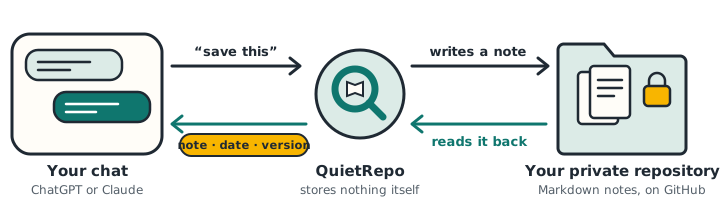
Your AI conversations, kept as notes in your own private GitHub repository. Ask the AI to save a decision, a passage or a whole document. Later, in any chat on either app, ask what you decided and why — the answer cites the note, its date and the exact version.
How it works
One repository, shared by ChatGPT and Claude. Plain Markdown you can open anywhere.
Save what matters
Say “save this to QuietRepo”. The AI writes a note — background, decisions, reasons, open questions — or saves a passage or document exactly as written.
Review before saving
The AI can show a card with the title, repository and content. Nothing is written until you click Save.
Find it with citations
Ask “why did we choose this?”. Answers link to the note at the exact version, and say when a later note superseded an earlier decision.
Chinese, Japanese, English
Search works across languages and tells you how much of the repository it searched, instead of guessing.
Edit safely
Rename, update or delete notes from the chat. An edit is refused if the note changed since the AI read it, so nothing is silently overwritten.
Files you own
Notes are Markdown files with readable front matter. Read and edit them in GitHub, Obsidian or any editor; the history is in Git.
Get started
You need a GitHub account and ChatGPT or Claude.
- Create a private repository on GitHub for your notes, for example
quietrepo-knowledge. - Install the QuietRepo GitHub App on that repository only: choose Only select repositories. Install the App.
- Add QuietRepo in ChatGPT or Claude and sign in with GitHub. MCP server URL:
https://quietrepo-mcp.quietrepo-dev-poc.workers.dev/mcp - Try it: “Save this discussion to QuietRepo”, then in a new chat: “What did I decide about this? Check QuietRepo.”
The QuietRepo App asks only for read and write access to the contents of the repositories you select, and read access to their metadata.
Privacy in short
Limits
- QuietRepo cannot read your whole conversation; it saves exactly what the AI passes to it.
- Only private GitHub repositories, one per connection.
- Search matches words; across languages it relies on the AI adding translated keywords.